9870-048
[macOS] Editing the fax address book
Steps for editing addresses using FAX Utility are described here.
This section uses macOS 11 (Big Sur) as an example.
1
In macOS, display the [System Preferences] dialog box, and then click [Printers & Scanners].
2
Select the machine, and then click [Options & Supplies].
3
Select [Utility], and then click [Open Printer Utility].
4
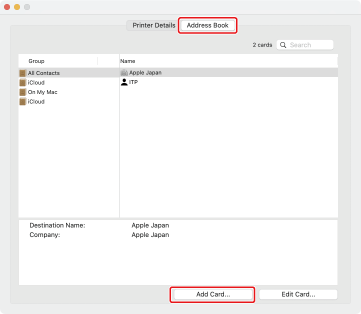
Click [Address Book]  [Add Card].
[Add Card].To edit an already-registered card, select the card, and then click [Edit Card].
5
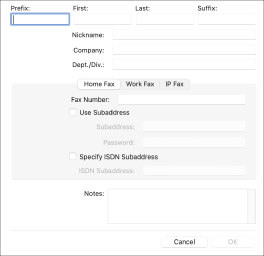
Edit items if necessary.
Specify at least one of name ([Last], [First], [Nickname], or [Company]) and at least one [Fax Number] ([Home Fax], [Work Fax], [IP Fax], or [Fax Number/URI]).
6
Click [OK].