514C-032
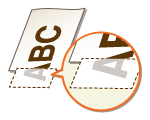
A Portion of the Page Is Not Printed
A possible cause may be that there is a problem with the margin settings or paper is not loaded properly. Check the following.
Do you print data without margins?
This symptom occurs if a margin is set to none in the printer driver. Make sure to have margins around the document to print.
[Finishing] tab  [Advanced Settings] [Expand Print Region and Print] [Off] |
NOTE
For the printable area with the machine:
Do the paper guides align with the edges of the paper?
If the paper guides are too loose or too tight, part of a document may not be printed.
Are you using custom size paper loaded in correct orientation?
Load the custom size paper in landscape orientation when you print without using the Canon Generic Plus UFR II printer driver.
Load the custom size paper in portrait orientation if the following conditions are met when you are using the Canon Generic Plus UFR II printer driver.
Paper Size in Select Feeder Menu | <Free Size> |
Loaded Paper | Long edge length is 215.9 mm or less. |