CHYE-00H
Avoiding Duplicate Report Printing When Fax Send Errors Occur or Transmission is Canceled
This section describes how to ensure that only a single-page report is printed when a fax send error occurs or transmission is canceled.
If a fax send error occurs or fax transmission is canceled, a TX report and a fax TX report are both printed.
TX report: Report printed when a fax, e-mail, or file is sent or data is stored in a mail box
Fax TX report: Report printed when a fax is sent
You can use the steps below to specify which reports are output.
1
On the <Home> screen, press  (Settings/Registration).
(Settings/Registration).2
Press <Function Settings>  <Send> <Fax Settings>.
<Send> <Fax Settings>.3
Press <Fax TX Report>.
4
Press <For Error Only> or <Off>.
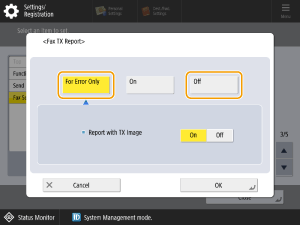
<For Error Only>
If a fax send error occurs or transmission is canceled, a Fax TX report is printed. When <For Error Only> is selected in this setting, use the procedure below so as not to print a TX report.
In (Settings/Registration) <Function Settings> <Send> <Common Settings>, set <TX Report> to <Off>.
(Settings/Registration) <Function Settings> <Send> <Common Settings>, set <TX Report> to <Off>.<Off>
If a fax send error occurs or transmission is canceled, a Fax TX report is not printed. When <Off> is selected in this setting, use the procedure below so as not to print a TX report.
In (Settings/Registration) <Function Settings> <Send> <Common Settings>, set <TX Report> to <For Error Only>.
(Settings/Registration) <Function Settings> <Send> <Common Settings>, set <TX Report> to <For Error Only>.5
Press <OK>.
6
Press <Close>.