9857-008
The Document Printed from a Computer Is Not on the Machine (Secure Print) (LBP674Cx / LBP673Cdw / LBP248x / LBP246dw)
A secured document is automatically deleted after its valid period has elapsed. How to change the valid period is described here.
1
Select <Menu> in the Home screen.
2
Select <Function Settings>  <Secure Print>.
<Secure Print>.If a login screen is displayed,
Department ID Management of System Manager IDs are set on the machine. Log in to the machine with the following procedure.
1
Enter the Department ID.
2
Enter the PIN.
3
Press <Log In> ( ).
).
).3
Select <Secure Print Deletion Time>.
4
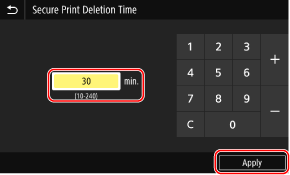
Change the period of time until which a secured document is preserved in the memory, and then press <Apply> ( ).
).
).
5
When using a touch panel model, select <Apply> <OK>, turn OFF the machine, and then turn ON the machine again after 10 seconds.
<OK>, turn OFF the machine, and then turn ON the machine again after 10 seconds.