When Connecting with TCP/IP
1.
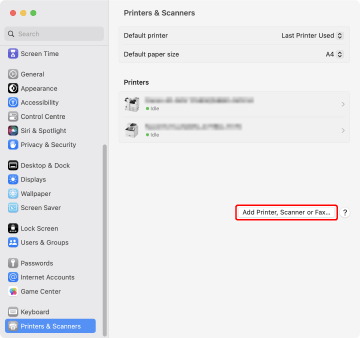
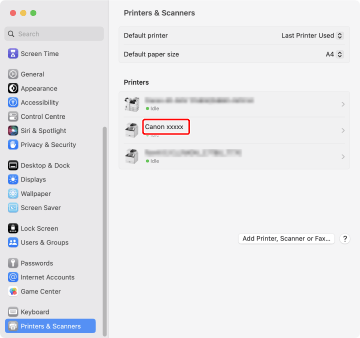
Open [System Settings] in macOS → click [Printers & Scanners] in the sidebar.
2.
Click [Add Printer, Scanner, or Fax].
3.
Click [ IP], and then select [Line Printer Daemon – LPD] from [Protocol].
IP], and then select [Line Printer Daemon – LPD] from [Protocol].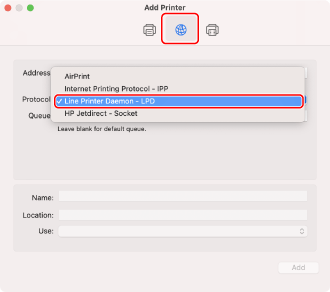
NOTE |
[Internet Printing Protocol - IPP] is not supported. |
4.
Enter the IP address of the printer you are using in [Address].
5.
If the driver is not automatically selected, select the driver corresponding to the printer you are going to use.
(1) | Select [Select Software] from [Use]. 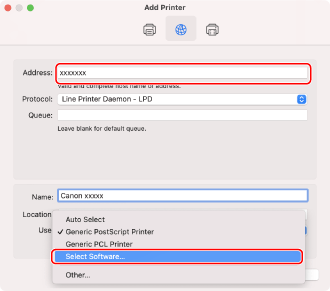 |
(2) | Enter the number included in the model name of the printer in the search field, select the corresponding driver in the search results, and then click [OK]. For example, if the model name is "LBP7110C", enter "7110" and select "Canon LBP7100C/7110C" in the search results. 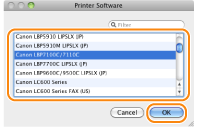 |
NOTE |
Select a driver with a name starting with "Canon". |
6.
Click [Add].
7.
Make sure that the printer to be used is displayed, then close the [Printers & Scanners] dialog box.
The printer is now ready to print from the computer.