Installing iW Desktop Floating License Service
The local license server requires iW Desktop Floating License Service to use a floating license.
|
NOTE
|
|
Your server administrator should perform this procedure on the local license server.
|
1.
Start Windows and log onto the system as a user with Administrator privileges.
2.
Copy the "iW Desktop Floating License Service.msi" file from the Floating License Installation Media to a location of your choice.
3.
Double-click the "iW Desktop Floating License Service.msi" file you copied.
4.
Click [Next].

5.
Check the content of the License Agreement. Select [I accept the terms in the license agreement] if you agree, and then click [Next].

6.
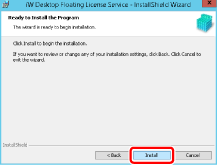
Click [Install].
|
NOTE
|
|
Operations are not guaranteed when the file is copied to a location other than a local disk.
To uninstall iW Desktop Floating License Service, use [Programs and Features] in [Control Panel].
|
7.
Click [Finish].