Returning Floating Licenses via the Internet (Online Authentication)
If the local license server is connected to the Internet, use the Internet to return the floating license.
|
NOTE
|
|
Your server administrator should perform this procedure on the local license server.
|
1.
Execute the "Start-FloatingLicenseInformationManagement.vbs" file in the "LicenseTools" > "<language name>" folder you copied to a local folder of your choice.
Floating License Information Manager is started.
|
NOTE
|
|
Floating License Information Manager can also be started from the Floating License Installation Media. In this case, double-click the "Start-FloatingLicenseInformationManagement.vbs" file in the "LicenseTools" > "<language name>" folder.
|
2.
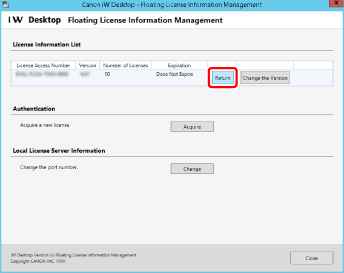
Click [Return].
3.
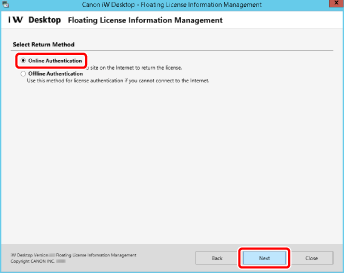
Select [Online Authentication] and click [Next].
4.
Click [Return].

5.
Click [Exit].