Creating New Binder Documents
Any document printable on your computer can be collected into a binder document.
Document Binder enables you to easily create binder documents.
This section describes how to create a binder document using [New] in the [File] menu of Document Binder.
|
Note
|
|
For details on how to create binder documents when starting Document Binder from Desktop Browser, see the following.
You can also create a new binder document with Microsoft Office and other applications.
|
In addition, refer to the following as necessary.
1.
Click  (New) on the Toolbar on the Document Binder screen.
(New) on the Toolbar on the Document Binder screen.Or, select the [File] menu > [New].
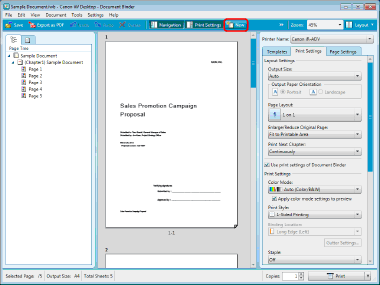
The Document Binder screen appears with no contents displayed.
The display "New Document 1" is shown in the [Page Tree] list of the Navigation Pane (The suffix number is incremented by one, for example 2, 3, ..., each time you create a new document.)
|
Note
|
|
If buttons are not displayed on the Document Binder Toolbar, set the buttons on the Toolbar. For more information, see the following.
|
2.
Click  (Import) on the Toolbar, and then select [Import from Library] or [Import from Windows Folder].
(Import) on the Toolbar, and then select [Import from Library] or [Import from Windows Folder].Or, follow one of the steps described below.
Select the [File] menu > [Import from Library].
Select the [File] menu > [Import from Windows Folder].
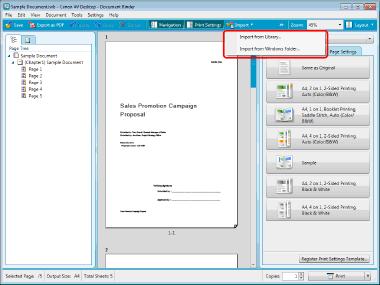
The [Open] dialog box is displayed.
|
Note
|
|
Selecting [Import from Windows Folder] displays the [Import] dialog box.
If buttons are not displayed on the Document Binder Toolbar, set the buttons on the Toolbar. For more information, see the following.
|
3.
Select a document, and click [Open].
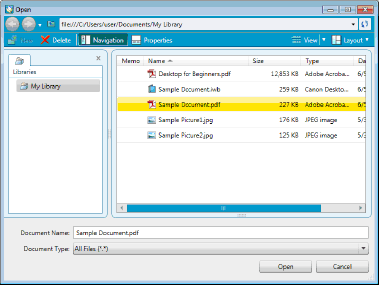
The selected document is added to the binder document.
|
Note
|
|
The [Print] dialog box or the [Printing] dialog box of the application used to created the document may be displayed. In this case, select Desktop Document Writer as the output printer and print.
For more information on how to add more documents to an existing binder document, see the following.
For more information on documents that cannot be added to a binder document, see the following.
|