Creating the Quick Printing Tool
1.
Right-click  (Printer Monitor) in the taskbar, and select [Create iR-ADV Desktop Quick Printing Tool].
(Printer Monitor) in the taskbar, and select [Create iR-ADV Desktop Quick Printing Tool].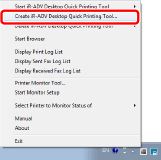
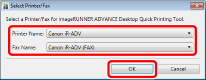
The [imageRUNNER ADVANCE Desktop Quick Printing Tool Settings] dialog box is displayed, and [Select Printer/Fax] is displayed.
2.
In [Select Printer/Fax], select the printer/fax to register to the Quick Printing Tool and then click [OK].
|
NOTE
|
|
When selecting a printer, the fax driver is automatically selected if a supported fax driver is installed.
|
3.
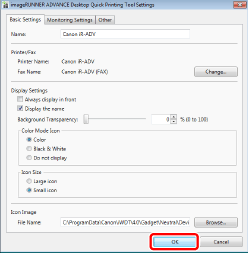
Specify the detailed settings for the Quick Printing Tool in the [Basic Settings] tab and [Monitoring Settings] tab, and then click [OK].