About This Manual
System Requirements
The manual works with the following web browsers. Use the manual with the script functions and cookies activated in the web browser.
Windows
Internet Explorer 8 and later
Microsoft Edge
Firefox 38 and later
Firefox ESR 38 and later
Chrome 45 and later (Online browsing only)
Mac OS
Safari 8 and later
Firefox 38 and later
Chrome 45 and later (Online browsing only)
iOS
Safari (iOS 6.0 and later)
Android
Chrome 45 and later (Online browsing only)
Symbols Used in This Manual
The following symbols are used in this manual to explain procedures, restrictions, handling precautions, and instructions that should be observed for safety.
 Important Important |
Indicates operational requirements and restrictions. Be sure to read these items carefully to operate the machine correctly, and avoid damage to the machine or property.
|
 Note Note |
Indicates a clarification of an operation, or contains additional explanations for a procedure. Reading these notes is highly recommended.
|
Buttons/Icons Used in This Manual
This manual indicates screen names, item names and button names displayed as follows.
Buttons, setting items and selection items displayed in the screens: [Next]
Icons displayed in the screens:  (Option)
(Option)Regarding Screens
Computer operation screens used in this manual are examples.
The actual display may differ according to your environment or administrator settings.
This manual describes operations under the following conditions unless otherwise stated.
Desktop is installed on Windows 7
Desktop has not been customized since it was installed.
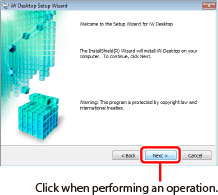
The buttons which you should click or press are marked with a  , as shown below. When multiple buttons or items are used for an operation, all buttons and items are marked.
, as shown below. When multiple buttons or items are used for an operation, all buttons and items are marked.1.
Click [Next].
Regarding Abbreviations
This manual uses the following abbreviations to describe the respective names.
Microsoft Windows Vista operating system: Windows Vista
Microsoft Windows 7 operating system: Windows 7
Microsoft Windows 8 operating system: Windows 8
Microsoft Windows 8.1 operating system: Windows 8.1
Microsoft Windows operating system: Windows
Microsoft .NET Framework: .NET Framework
imageRUNNER ADVANCE Desktop: Desktop
imageRUNNER ADVANCE Desktop Printer Monitor: Printer Monitor
imageRUNNER ADVANCE Desktop Document Monitor: Document Monitor
imageRUNNER ADVANCE Desktop Monitor Setup: Desktop Monitor Setup
imageRUNNER ADVANCE Desktop Browser: Desktop Browser
imageRUNNER ADVANCE Desktop Desktop Editor: Desktop Editor
imageRUNNER ADVANCE Desktop User's Guide: User's Guide
Canon Desktop Document Writer: Desktop Document Writer
imageRUNNER ADVANCE series devices: devices
A Network Library that uses a database to manage folders and documents: Network Library (Database)