Folder Monitoring Settings
Document Monitor manages the logs of unread and updated documents in the folder specified as a monitoring target. The user is notified of unread and updated documents via icons and popups in the taskbar. This can ensure that the user checks all the documents which need to be read.
Configuring Monitoring
You can select and set a folder in Desktop to be monitored for added or updated documents.
1.
Select the folder to monitor in the Navigation Window or the File List View Window of the Desktop Browser screen.
2.
Click  (Monitor Folder) on the ribbon.
(Monitor Folder) on the ribbon.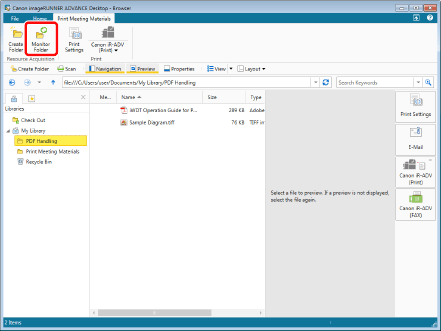
The selected folder is configured as a monitoring target, and the display of the folder icon changes to  (Monitor Selected Folder).
(Monitor Selected Folder).Configuring Notifications
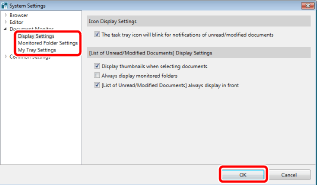
You can configure the interval to monitor the monitoring target folders and the notification method when there are added/updated documents.
1.
Right-click  (Document Monitor) in the taskbar, and select [Document Monitor Settings].
(Document Monitor) in the taskbar, and select [Document Monitor Settings].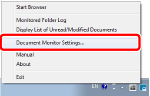
2.
If necessary, specify each item, and click [OK].