Confirming the Print Restrictions on Client Computers
Confirm that the specified print restriction information is being correctly applied on the client computers.
|
NOTE
|
|
For details on operating the AMS Printer Driver Add-in, see the Online Help for the AMS Printer Driver Add-in.
|
1.
Log on to the computer of which the user name and password of [sales_temp] are set to the AMS Printer Driver Add-in.
2.
Perform color printing from an application of your choice.
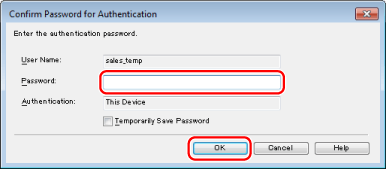
The [Confirm Password for Authentication] dialog box is displayed.
|
NOTE
|
|
In this example, [Confirm Password for Authentication] dialog box is because [Save password and skip authentication dialog box when printing] was not selected when setting the user information in the AMS Printer Driver Add-in.
|
3.
Enter the password → click [OK].
[Password] : t_password
The [Confirmation of Print Restrictions] dialog box is displayed.
|
NOTE
|
|
In this example, the [Confirmation of Print Restrictions] dialog box is displayed because [Check Print Restriction Information When Printing] was selected when setting the user information in the AMS Printer Driver Add-in.
When you print from the Windows Store app in Windows 8/Server 2012, if you have configured the settings so that you are required to enter a password when printing, the message "The printer requires your attention. Go to the desktop to take care of it." is displayed. If this happens, move to the desktop and follow the instructions in the displayed dialog box.
Note that the message will disappear after a while, but printing will not start until you have moved to the desktop and performed the operation displayed in the dialog box. If you select [Temporarily Save Password], you do not have to enter the password from the next time you print.
|
4.
Confirm the displayed print restriction information → click [Yes].
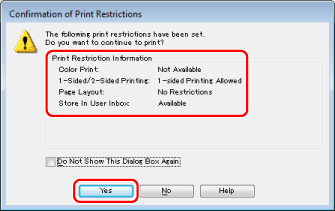
Printing is executed.
|
NOTE
|
|
When you print from the Windows Store app in Windows 8/Server 2012, if you have configured the settings so that you are required to confirm print restriction information when printing, the message "The printer requires your attention. Go to the desktop to take care of it." is displayed. If this happens, move to the desktop and follow the instructions in the displayed dialog box.
Note that the message will disappear after a while, but printing will not start until you have moved to the desktop and performed the operation displayed in the dialog box. If you select [Do Not Show This Dialog Box Again], you can print without displaying this screen from the next time you print.
|
5.
Confirm that the document is printed in black-and-white.
6.
Log in with the other users and confirm that the print restrictions are set correctly.
In this example, the following should be displayed for each user.
|
User Name
|
Password
|
[Color Print]
|
[1-Sided/2-Sided Printing]
|
[Page Layout]
|
[Store In User Inbox]
|
|
sales_manager
|
m_password
|
Available
|
1-sided Printing Allowed
|
No Restrictions
|
Available
|
|
sales_regular
|
r_password
|
Available
|
1-sided Printing Allowed
|
No Restrictions
|
Available
|
|
sales_temp
|
t_password
|
Not Available
|
1-sided Printing Allowed
|
No Restrictions
|
Available
|
|
IT_management
|
admin_password
|
Available
|
1-sided Printing Allowed
|
No Restrictions
|
Available
|
|
Guest user
|
Guest users cannot print from computers.
|
||||