Inserting Image Stamps
With Desktop Editor, you can insert a registered image into a document as an annotation.
|
NOTE
|
|
You can insert newly registered image stamps, as well as the image stamps that are registered automatically during installation. For more information, see the following.
|
1.
Click  for
for  (Stamp) on the ribbon, and select the image stamp to insert.
for (Stamp) on the ribbon, and select the image stamp to insert.Or, click  for
for  (Stamp) on the Details Window, and select the image stamp to insert.
for (Stamp) on the Details Window, and select the image stamp to insert.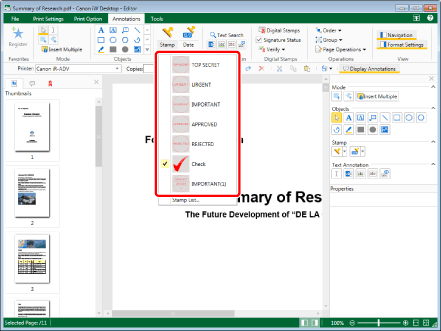
The preview of the selected image stamp is displayed on the Details Window.
|
NOTE
|
|
The last stamp used can be selected by performing one of the following operations.
Click
 for (Stamp) on the ribbon for (Stamp) on the ribbon Click
 for (Stamp) on the Details Window for (Stamp) on the Details WindowIf the Details Window is not displayed, see the following.
This operation can also be performed with the tool buttons on the toolbar. If tool buttons are not displayed in the toolbar of Desktop Editor, see the following to display them.
When you want to insert image stamps multiple times, double-click
for (Stamp) on the Details Window. When you double-click the button, it is locked while being selected and image stamps can be inserted multiple times.Perform one of the following operations to cancel the button selection.
Click
 for for  (Stamp) on the Details Window. (Stamp) on the Details Window.Click another button on the Details Window
Click a command on the ribbon
Press the [Esc] key on the keyboard.
You can click
 (Insert Multiple) on the ribbon to insert multiple stamps. For more information, see the following. (Insert Multiple) on the ribbon to insert multiple stamps. For more information, see the following. |
|
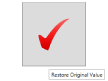
[Restore Original Value]
|
Restores the changed stamp properties to the values set when the stamp was registered. This is only valid before inserting a stamp.
|
|
NOTE
|
|
You can also restore the changed stamp properties to the values set when the stamp was registered with the following command.
 (Restore Original) (Restore Original)If commands are not displayed on the ribbon of Desktop Editor, see the following to display them.
This operation can also be performed with the tool buttons on the toolbar. If tool buttons are not displayed on the toolbar of Desktop Editor, see the following to display them.
|
2.
Move the mouse pointer to the Work Window.
The shape of mouse pointer becomes  , and a preview of the selected image stamp is displayed.
, and a preview of the selected image stamp is displayed.|
NOTE
|
|
To cancel the insertion process, do one of the following.
Click
 (Select Object) on the ribbon (Select Object) on the ribbonClick
 (Select Text) on the ribbon (Select Text) on the ribbonClick
 (Grab Mode) on the ribbon (Grab Mode) on the ribbonClick
 for for  (Stamp) on the ribbon (Stamp) on the ribbonClick
 (Select Object) on the Details Window (Select Object) on the Details WindowClick
 (Select Text) on the Details Window (Select Text) on the Details WindowClick
 (Grab Mode) on the Details Window (Grab Mode) on the Details WindowClick
for (Stamp) on the Details WindowPress the [Esc] key on the keyboard
|
3.
Set the preview where you want to insert an image stamp, and click it.
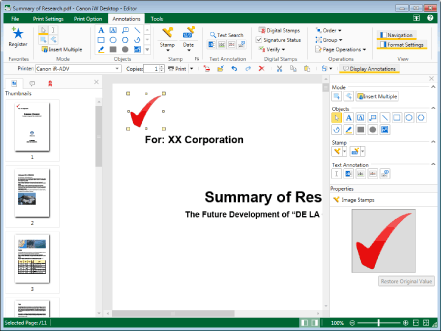
The stamp is inserted.
|
NOTE
|
|
When the edge of the image stamp exceeds the edge of the page, the size of the image stamp is automatically reduced to fit the page while the aspect ratio of the image is maintained.
|
4.
Click on the Work Window outside the stamp you inserted to deselect the stamp.
|
NOTE
|
|
Stamps registered by users can be edited. For more information, see the following.
|