Displaying/Hiding Annotations
You can show/hide annotations added to the document.
This section describes how to hide annotations.
1.
Click  (Display Annotations) on the ribbon.
(Display Annotations) on the ribbon.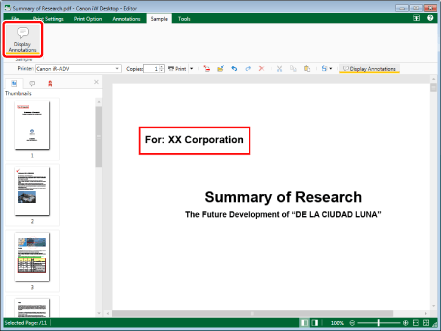
Annotations added to the document are hidden.
|
NOTE
|
|
To display annotations, click
 (Display Annotations) on the ribbon. (Display Annotations) on the ribbon.If commands are not displayed on the ribbon of Desktop Editor, see the following to display them.
This operation can also be performed with the tool buttons on the toolbar. If tool buttons are not displayed on the toolbar of Desktop Editor, see the following to display them.
Digital stamps cannot be hidden.
Annotations added with something other than Desktop Editor may be unable to be hidden, depending on their type.
If the [Display print/send fax dialog] check box is deselected in [System Settings], a confirmation message is displayed if you perform one of the following operations when annotations are hidden. To print annotations, click [Print with annotations].
Click
 for [Print] on the ribbon, or for [Print] on the ribbon, or  for [Print] on the Details Window for [Print] on the Details WindowClick
 for [Print] on the ribbon or for [Print] on the ribbon or  for [Print] on the Details Window, and select [Print] or [Print Selected Pages] for [Print] on the Details Window, and select [Print] or [Print Selected Pages]Click
 (Print Selected Pages) on the ribbon (Print Selected Pages) on the ribbonClick
 for [Fax] on the ribbon, or for [Fax] on the ribbon, or  for [Send Fax] on the Details Window for [Send Fax] on the Details WindowClick
 for [Fax] on the ribbon or for [Send Fax] on the Details Window, and select [Send Fax] or [Send Selected Pages] for [Fax] on the ribbon or for [Send Fax] on the Details Window, and select [Send Fax] or [Send Selected Pages]Click
 (Send Selected Pages) on the ribbon (Send Selected Pages) on the ribbon[File] menu > [Option] > [System Settings] > [Common Settings] > [Print/Fax] > [Display print/send fax dialog]
Performing one of the following operations while annotations are hidden displays the annotations.
Start the Digital Stamps Mode
Start the Redaction Mode
Add an annotation
|