Printing Files Stored in the Hold Queue
This section describes the procedure for printing documents stored in the Hold Queue. You can specify the order in which to print.
1.
Press  (Main Menu) → [Hold].
(Main Menu) → [Hold].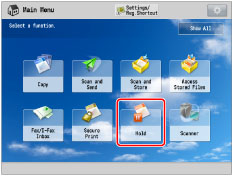
2.
Select the job that you want to print from the Hold Job List → press [Start Printing].
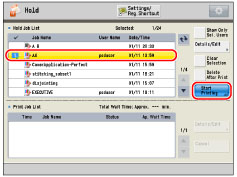
If there are seven or more stored files, press [ ] or [
 ] to scroll through the stored files. You can select multiple jobs stored in the Hold Queue.
] or [] to scroll through the stored files. You can select multiple jobs stored in the Hold Queue.To select all of the files (up to 100 files from the top) in the Hold Que, press [Select All (Max 100)]. (If a job is already selected, this key changes to [Clear Selection].)
|
NOTE
|
|
The selected jobs are numbered in the order specified, and are printed in that order.
You can cancel a selection by selecting the job again.
To cancel all files, press [Clear Selection]. ([Clear Selection] changes to [Select All (Max 100)].)
If you press [Start Printing], the Print Job List screen is displayed.
You can start printing multiple jobs (up to 32 files) at the same time.
|