Booklet Scanning
This mode enables you to scan originals in such a way that, when printing the scanned data, the output paper can be made into a booklet. Specify the Booklet mode when printing the scanned data. (See "Booklet Mode" and "Perfect Binding.")
|
IMPORTANT
|
|
This mode is only available for storing files in a mail box.
|
1.
Press  (Main Menu) → [Scan and Store] → [Mail Box].
(Main Menu) → [Scan and Store] → [Mail Box].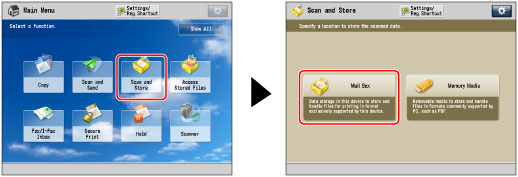
2.
Select the desired Mail Box → press [Scan].

3.
Press [Options] → [Booklet Scan].

4.
Select the desired booklet scanning size.

If you place a two-sided original, press [2-Sided Original] → select the type of two-sided original → press [OK].
|
[Book Type]:
|
The front and back sides of the original have the same top-bottom orientation.
|
|
[Calendar Type]:
|
The front and back sides of the original have opposite top-bottom orientations.
|
To specify the original size, press [Change] for <Original Size> → select the size → press [OK].
To change the booklet layout size, press [Change] for <Layout Size> → select the layout size → press [OK].
|
NOTE
|
|
You cannot select [2-Sided Original] if STMTR is the selected original size.
The machine automatically selects the zoom ratio depending on the selected layout size.
|
5.
Press [OK] → [Close].
|
IMPORTANT
|
|
Originals must all be the same size.
|
|
NOTE
|
|
Make sure to place originals with a vertical (portrait) orientation vertically. If these originals are placed horizontally, the even numbered pages will be printed upside down.
|