Multi-drawer Paper Deck-B1
If the Multi-drawer Paper Deck-B1 is attached, it can provide three additional paper sources.
Up to 2,000 sheets of paper (80 g/m2) each can be loaded into the upper, middle, and lower decks of the Multi-drawer Paper Deck-B1.
|
IMPORTANT
|
|
If the machine is in the Sleep mode (the touch panel is not displayed, and only
 is lit), you may be unable to open the Multi-drawer Paper Deck-B1. In this case, press to reactivate the machine, and then press the open button on the Multi-drawer Paper Deck-B1. is lit), you may be unable to open the Multi-drawer Paper Deck-B1. In this case, press to reactivate the machine, and then press the open button on the Multi-drawer Paper Deck-B1. |
|
NOTE
|
|
For information on the available paper, see "Available Paper Stock."
To detect when multiple papers are fed with the Multi-drawer Paper Deck-B1, the Paper Deck Double Feeding Detection Kit-A1 is required.
|
Parts and Their Functions
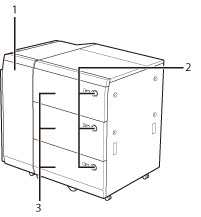
|
1.
|
Front Cover (Buffer Pass)
Open this cover to remove jammed paper. (See "Front Cover of the Multi-drawer Paper Deck-B1 (Optional).")
|
|
2.
|
Open Button
Press to open the paper deck when you need to load paper or check for a paper jam.
|
|
3.
|
Paper Deck
Up to 2,000 sheets of paper (80 g/m2) each can be loaded into the upper, middle, and lower decks.
|