Visualisation d'un fichier PDF
Il est possible de visualiser un fichier PDF lié.
1.
Appuyer sur le lien vers le fichier PDF de la page Web.
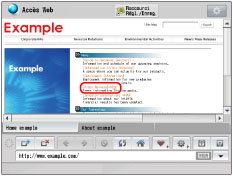
Il n'est pas possible de spécifier plusieurs fichiers PDF simultanément. En outre, les fichiers PDF ne peuvent pas être ouverts dans plus de deux fenêtres.
Si un mot de passe a été configuré pour le fichier PDF spécifié, saisir le mot de passe.
2.
Appuyer sur [Voir] → [OK].
Le fichier PDF sélectionné s'affiche.
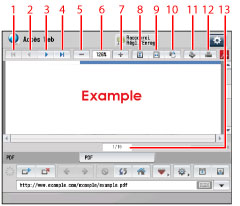
Les boutons sur l'écran d'affichage de fichier PDF sont les suivants :
|
(1)
|
Première page:
|
Returns to the first page.
|
|
(2)
|
Précédente:
|
Returns to the previous page.
|
|
(3)
|
Suivante:
|
Proceeds to the next page.
|
|
(4)
|
Dernière page:
|
Proceeds to the last page.
|
|
(5)
|
Réduction:
|
Reduces the display to a minimum of 25%.
|
|
(6)
|
Valeur d'échelle:
|
Displays the scale ratio for PDF file that is currently displayed.
|
|
(7)
|
Agrandissement:
|
Enlarges the display to a maximum of 200%.
|
|
(8)
|
Réglage en hauteur:
|
Adjusts the display to the height of the PDF file.
|
|
(9)
|
Réglage en largeur:
|
Adjusts the display to the width of the PDF file.
|
|
(10)
|
Rotation:
|
Rotates the display 90 degrees to the right.
|
|
(11)
|
Mémorisation dans la boîte aux lettres:
|
Saves the file in a mail box. (Voir "Enregistrement d'un fichier PDF dans une boîte aux lettres".)
|
|
(12)
|
Imprimer:
|
Prints the PDF file. (Voir "Impression d'un fichier PDF".)
|
|
(13)
|
Choix de la page:
|
Proceeds to the specified page.
|
When you press [Choix de la page], a screen is displayed. To proceed to a specific page, enter the desired page number using  -
-  (numeric keys) → press [OK].
- (numeric keys) → press [OK].|
REMARQUE
|
|
Il se peut que le fichier PDF ne s'affiche pas correctement, selon sa version.
|