Requesting Certificate Signing
You can send a CSR (certificate signing request) for the public key of the key pair generated with the machine to a certificate authority. A certificate signing request is for issuing a public key certificate that proves that the public key is valid. The generated public key certificate can be registered in the machine and used.
1.
Click [Key and Certificate Settings] on the AirPrint portal page.
2.
Click [Generate Key] → [Key and Certificate Signing Request (CSR)].
3.
Specify the required settings → click [OK].
|
[Key Name]:
|
Enter the name of the key pair.
|
|
[Signature Algorithm]:
|
Select the algorithm of the certificate to request from the drop-down list.
|
|
[Key Algorithm]:
|
Set the key type and key length. If you selected RSA, select [512], [1024], [2048], or [4096] for the key length. If you selected ECDSA, select [P256], [P384], or [P521].
|
|
[Country/Region]:
|
Select a country/region name or set an internet country code for one of the 25 available countries and regions.
|
|
[State]:
|
Set the state name.
|
|
[City]:
|
Set the city name.
|
|
[Organization]:
|
Set the organization name.
|
|
[Organization Unit]:
|
Set the organization unit, such as the department name.
|
|
[Common Name]:
|
Set the IP address or FQDN (e.g., example.company.com) of the machine.
|
After you click [OK], CSR data encoded in base64 is displayed in [Certificate Signing Request (CSR)].
|
IMPORTANT
|
|
A key pair that a certificate signing request has been sent for cannot be set as the key to use.
|
4.
Click [Store in File].
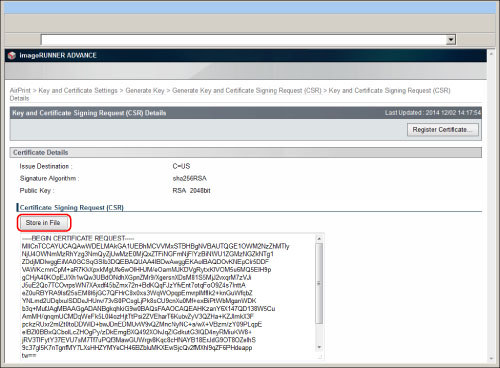
Up to 256 characters can be set for a filename. ".csr" can be used as the file extension.
The CSR data (certificate request) is downloaded.
5.
Send the downloaded certificate signing request to the certificate authority.
The certificate authority will issue a public key certificate.
|
NOTE
|
|
For more information, see the website of the certificate authority or contact the CA administrator.
|
6.
Click [Register Certificate...].
Select the public key certificate that was issued.
7.
Click [Register].
The public key certificate is registered in the machine.