Inner 2 Way Tray-F1 (Optional)
Check the location of the paper jam, and follow the procedure described below, while referring to the directions that appear on the touch panel display, to remove the jammed paper.
|
NOTE
|
|
The Inner 2 Way Tray-F1 is an optional product.
If the Paper Deck Unit-B2 is attached, move the paper deck unit away from the main unit before proceeding with this procedure.
If the Copy Tray-J1 is attached to the main unit, remove all output paper from the tray.
|
1.
Open the lower right and upper right covers of the machine.
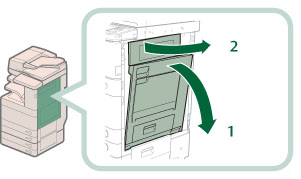 |
1.Grip the handle, and open the lower right cover of the machine. |
2.Open the upper right cover of the machine. |
2.
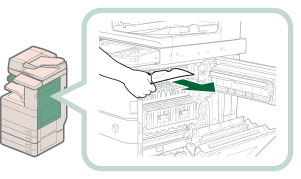
Remove any jammed paper.
3.
Close the upper right cover and then close the lower right cover.
 CAUTION CAUTION |
|
When closing the upper and lower right covers of the main unit, be careful not to get your fingers caught, as this may result in personal injury.
|
|
NOTE
|
|
Gently close the covers until they click into place in the closed position.
If the Paper Deck Unit-B2 was moved away from the main unit, reconnect it to the main unit.
|
4.
Follow the instructions on the screen.
|
NOTE
|
|
The screen indicating the directions on how to clear the paper jam is displayed repeatedly until the paper jam is cleared.
|