Inside the Top Cover
Check the location of the paper jam, and follow the procedure described below, while referring to the directions that appear on the touch panel display, to remove the jammed paper.
1.
Open the front cover of the finisher.
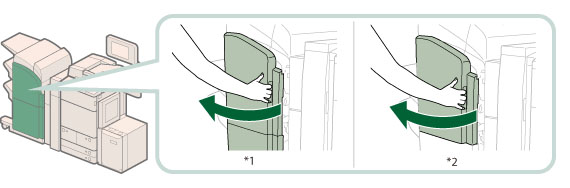
*1 Booklet Finisher-L1
*2 Staple Finisher-L1
If the Document Insertion/Folding Unit-G1 or Document Insertion Unit-J1 is attached, open the insertion unit. (See "Document Insertion/Folding Unit-G1/Document Insertion Unit-J1.")
2.
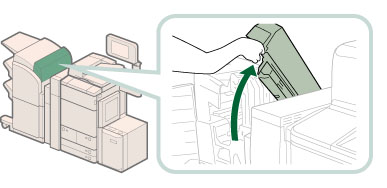
Open the top cover of the finisher.
3.
Remove any paper jammed from the top cover of the finisher.
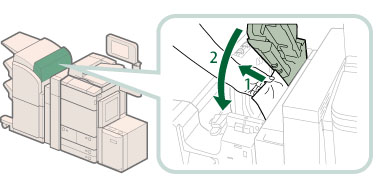 |
1. Remove any jammed paper. |
2. Close the top cover of the finisher.If you open the Document Insertion/Folding Unit-G1 or Document Insertion Unit-J1 in step 1, close the insertion unit.
|
 CAUTION CAUTION |
|
When closing the cover, be careful not to get your fingers caught, as this may result in personal injury.
|
4.
Close the front cover of the finisher.
|
CAUTION |
|
When closing the cover, be careful not to get your fingers caught, as this may result in personal injury.
|
5.
Follow the instructions on the screen.
|
NOTE
|
|
The screen indicating the directions on how to clear the paper jam is displayed repeatedly until the paper jam is cleared.
|