Specifying Destinations Using the One-Touch Buttons
|
IMPORTANT
|
|
To use this feature, you must first register destinations in one-touch buttons. (See "Storing/Editing/Deleting One-Touch Buttons.")
|
1.
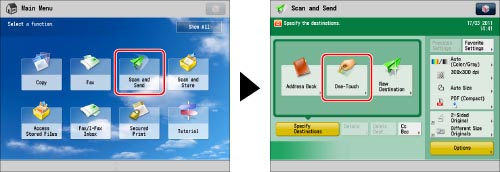
Press [Scan and Send] → [One-Touch].
2.
Select the desired one-touch button→press [OK].
If you know the three digit number for the one-touch button, you can press  → enter the three digit number of the desired one-touch button using
  -
-  (numeric keys).
→ enter the three digit number of the desired one-touch button using - (numeric keys).|
NOTE
|
|
You can select multiple one-touch buttons.
To cancel the selected one-touch button, press the one-touch button again.
|