Inner 2Way Tray-H1 (Optional)
Check the location of the paper jam, and follow the procedure described below, while referring to the directions that appear on the touch panel display, to remove the jammed paper.
|
NOTE
|
|
The Inner 2Way Tray-H1 is an optional product.
|
1.
Follow the instructions in "Main Unit" to remove any jammed paper.
2.
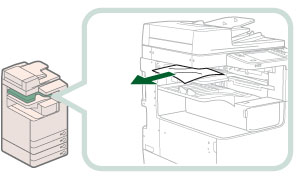
Remove any jammed paper from the Inner 2Way Tray.
3.
Follow the instructions on the screen.
|
NOTE
|
|
The screen indicating the directions on how to clear the paper jam is displayed repeatedly until the paper jam is cleared.
|