
Entering Sleep Mode
The sleep mode function reduces the amount of power consumed by the machine by disabling power flow to the operation panel. If no operations will be performed on the machine for a while, such as during a lunch break, you can save power simply by pressing  on the operation panel. You can also use the Auto Sleep Time setting to automatically put the machine into sleep mode if it remains idle for a specified length of time.
on the operation panel. You can also use the Auto Sleep Time setting to automatically put the machine into sleep mode if it remains idle for a specified length of time. 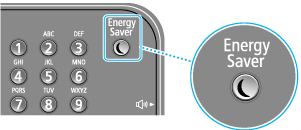
|
When in sleep modeWhen the machine enters sleep mode, lights up yellow green.Situations in which the machine does not enter sleep modeWhen the machine is in operation When the [Processing/Data] indicator is lit up or blinking When the machine is performing an operation such as adjustment or cleaning When a paper jam occurs When the receiver of the external telephone is off the hook When the menu screen is displayed When a job is waiting to be scanned to a USB memory device or to a computer When an error message is displayed on the screen (There are some exceptions. The machine sometimes enters sleep mode when error messages are displayed.) When the machine is communicating with a uniFLOW server |
When You Want to Set the Auto Sleep Timer
The factory default settings for the amount of time that elapses before the machine enters auto sleep mode are listed below. We recommend using the factory default settings to save the most power. If you want to change the amount of time that elapses before the machine enters auto sleep mode, follow the procedure below.
Color imageRUNNER C1335iF
1 minutes (setting range is 1 to 120 minutes)
Color imageRUNNER C1325iF
1 minutes (setting range is 1 to 60 minutes)
<Menu>  <Timer Settings> <Auto Sleep Time> Set the amount of time that elapses before the machine automatically enters sleep mode <Apply>
<Timer Settings> <Auto Sleep Time> Set the amount of time that elapses before the machine automatically enters sleep mode <Apply>Exiting Sleep Mode
Tap the display or press an Operation panel key.
|
If an external telephone is connected, the machine exits sleep mode when you take the receiver off the hook. |