This section describes how to access the fax driver screen from the [Control Panel] and how to specify the default fax settings.
You can edit address books, register cover sheet templates, set page formats, etc.
Specifying the Default Fax Settings (PC Fax)
|
IMPORTANT
|
|
To change the default fax settings, you must log on to your computer as a member of the Administrators group.
|
1.
Click [ ] (Start) -> [Devices and Printers].
] (Start) -> [Devices and Printers].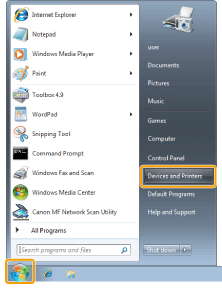
|
NOTE
|
|
For Windows 8 and Server 2012: From the desktop, display the charm bar to the right of the screen, and click or tap [
 Settings] -> [Control Panel] -> [Devices and printers]. Settings] -> [Control Panel] -> [Devices and printers].For Windows Vista, click [
 ] (Start) -> [Control Panel] -> [Printers]. ] (Start) -> [Control Panel] -> [Printers].For Windows XP Professional/Server 2003, click [Start] -> [Printers and Faxes].
For Windows XP Home Edition, click [Start] -> [Control Panel] -> [Printers and Other Hardware] -> [Printers and Faxes].
For Windows Server 2008, on the [Start] menu, click [Control Panel] and then double-click [Printers].
|
2.
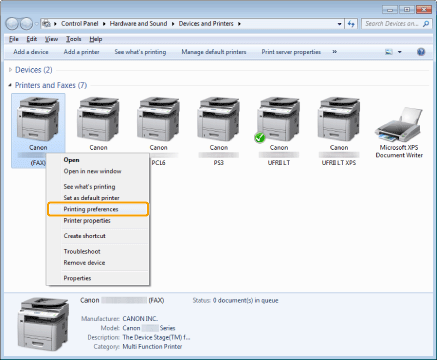
Right-click the icon of the fax whose settings you want to configure -> click [Printing preferences].
3.
Specify the desired settings in the fax driver screen -> click [OK].
Click each tab and specify the desired items.
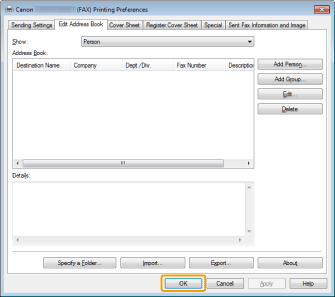
For details about the fax driver settings, view the online help. (See "Viewing the Online Help (PC Fax).")
|
NOTE
|
|
When faxing, you can change the default settings in the fax driver screen whenever required.
The display may differ according to the operating system and system environment.
|