Follow the steps in the procedure below to change the printer settings.
The procedure describes the steps to change the <Paper Size Override> setting.
Changing printer settings (Items to Be Specified Using [Menu] Button)

1
Press [ ] (Menu).
] (Menu).2
Select <Printer Settings> using [ ] or [
 ] and press [OK].
] or [] and press [OK].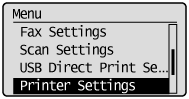
3
Make sure that <Paper Size Override> is selected and press [OK].
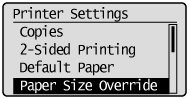
4
Select <Off> or <On> using [] or [] and press [OK].
] or [] and press [OK].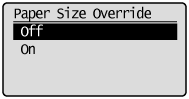
|
<Off>
|
An error message appears and the printing pauses without the replacement of a paper size.
|
|
<On>
|
The paper size will be replaced. However, if appropriate paper is not loaded, paper size replacement will not be performed.
|
5
Press [] (Menu) to close the menu screen.
] (Menu) to close the menu screen.The setup is complete.