Specifying Display Settings for the Job History
Specify whether to display the fax job history.
|
IMPORTANT
|
When the setup is completeRestart the machine to take effect the settings.
|
1
Press [ ] (Menu).
] (Menu).2
Select <System Settings> using [ ] or [
 ] and press [OK].
] or [] and press [OK].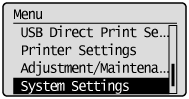
When the system manager ID and system manager PIN are specified
Use the numeric keys to enter the ID and number, and then press [ ] (Log In/Out).
] (Log In/Out).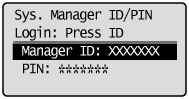
3
Select <Display Job History> using [] or [] and press [OK].
] or [] and press [OK].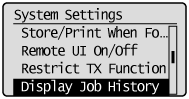
4
Select <Off> or <On> using [] or [] and press [OK].
] or [] and press [OK].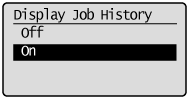
|
<Off>
|
Do not display the job history on the status monitor/cancel screen, or do not include it with the activity report. In addition, the activity report is not printed automatically.
|
|
<On>
|
Display the job history on the status monitor/cancel screen.
|
5
Press [] (Menu) to close the menu screen.
] (Menu) to close the menu screen.6
Restart the machine.
It is necessary to restart the machine to take effect the settings.
Turn OFF the machine and wait for at least 10 seconds before turning it back ON.
Turn OFF the machine and wait for at least 10 seconds before turning it back ON.