Specifying the Screen that Is Displayed after Auto Reset Is Performed
Specify whether to display the default screen selected in "Setting the Default Screen " after auto reset is performed.
1
Press [ ] (Menu).
] (Menu).2
Press [ ] or [
 ] to highlight <Timer Settings>, and press [OK].
] or [] to highlight <Timer Settings>, and press [OK].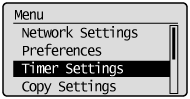
3
Press [] or [] to highlight <Screen After Auto Reset>, and press [OK].
] or [] to highlight <Screen After Auto Reset>, and press [OK].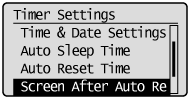
4
Press [] or [] to <Default Screen> or <Selected Screen>, and press [OK].
] or [] to <Default Screen> or <Selected Screen>, and press [OK].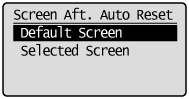
|
<Default Screen>
|
The screen selected in "Setting the Default Screen " is displayed.
|
|
<Selected Screen>
|
The screen displayed prior to auto reset is displayed again.
|
5
Press [] (Menu) to close the Menu screen.
] (Menu) to close the Menu screen.