Forwarding Received Faxes Stored in Memory to Other Destinations (Manual Forwarding)
When a fax is stored in memory, you can manually forward it to a specified destination.
|
NOTE
|
Destinations that can be specified:You can forward a fax to only one destination stored to the address book, one-touch key, or coded dialing code.
To restore received fax data in memory:See "Memory Lock Settings."
|
1
Press [ ] (Status Monitor/Cancel).
] (Status Monitor/Cancel).2
Press [ ] or [
 ] to highlight <Fax Job Status/History>, and then press [OK].
] or [] to highlight <Fax Job Status/History>, and then press [OK].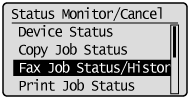
3
Press [] or [] to highlight <RX Job Status>, and then press [OK].
] or [] to highlight <RX Job Status>, and then press [OK].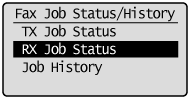
4
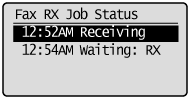
Press [] or [] to highlight the job you want to forward, and then press [OK].
] or [] to highlight the job you want to forward, and then press [OK].You cannot forward received faxes when
the machine is in the middle of receiving another fax
the machine starts printing a job after it has received a fax
5
Press [] or [] to highlight <Forward>, and then press [OK].
] or [] to highlight <Forward>, and then press [OK].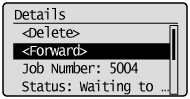
6
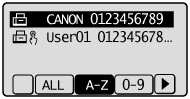
Specify the destination from the address book, and then press [OK].