Setting the Auto Reset Time
Set the Auto Reset time to return to the default screen after copying is completed or when a key operation is not performed for a certain period of time.
|
NOTE
|
The machine does not return to the default screen when:the Menu screen is displayed
a job is currently processing
a message appears on the display and the Error indicator is blinking (except for cases in which the job can be continued even when error message appears )
the documents are set in the feeder
|
1
Press [ ] (Menu).
] (Menu).2
Press [ ] or [
 ] to highlight <Timer Settings>, and then press [OK].
] or [] to highlight <Timer Settings>, and then press [OK].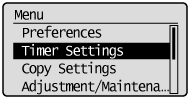
3
Press [] or [] to highlight <Auto Reset Time>, and then press [OK].
] or [] to highlight <Auto Reset Time>, and then press [OK].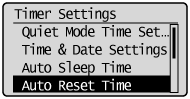
4
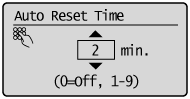
Press [] or [] to specify the time for the Auto Reset Time to activate, and then press [OK].
] or [] to specify the time for the Auto Reset Time to activate, and then press [OK].The machine does not return to the default screen automatically when you set the timer to <0>.
 |
You can also enter values using the numeric keys.
|
5
Press [] (Menu) to close the Menu screen.
] (Menu) to close the Menu screen.