Selecting the Document Type
You can adjust the image quality of copies according to the types of documents. A correct selection is necessary for the optimal reproduction of the document.
1
Place documents.
2
Press [ ] (COPY/SCAN) to switch to the Copy mode screen.
] (COPY/SCAN) to switch to the Copy mode screen.3
Press [ ] or [
 ] to highlight <Original Type>, and then press [OK].
] or [] to highlight <Original Type>, and then press [OK].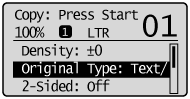
4
Press [] or [] to highlight the appropriate document type, and then press [OK].
] or [] to highlight the appropriate document type, and then press [OK].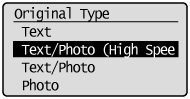
|
<Text>
|
This setting is suitable for documents that contain text without photos or illustrations.
|
|
<Text/Photo (High Speed)>
|
This setting is suitable for the documents that contain text and photos.
This setting scans the document at a low resolution at high speed. |
|
<Text/Photo>
|
This setting is suitable for documents that contain text and photos.
|
|
<Photo>
|
This setting is suitable for the documents that contain photos printed in a magazine.
|
 |
If <Density> is set to <Auto Density>, <Density> will be changed to <Manual Density> when you select <Text/Photo (High Speed)>, <Text/Photo>, or <Photo>.
|
5
Press [ ] (Start).
] (Start).