Cleaning the Fixing Unit
You should clean the fixing unit when:
Black streaks appear on the output
You replace the toner cartridge
1
Press [ ] (Menu).
] (Menu).2
Press [ ] or [
 ] to highlight <Adjustment/Maintenance>, and then press [OK].
] or [] to highlight <Adjustment/Maintenance>, and then press [OK].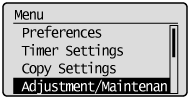
3
Press [] or [] to highlight <Clean Fixing Unit>, and then press [OK].
] or [] to highlight <Clean Fixing Unit>, and then press [OK].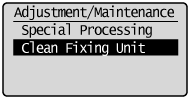
4
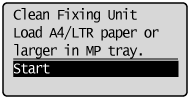
Check if the supported paper is set in the multi-purpose tray, and then press [OK].
The cleaning begins. It takes approximately 90 seconds to complete the process.
 |
We recommend that you load plain paper when cleaning the fixing unit.
|
 If the cleaning does not start: If the cleaning does not start: |
|
You cannot use this function when jobs are stored in memory.
|
5
Press [] (Menu) to close the Menu screen.
] (Menu) to close the Menu screen.