Setting Up the Menu Options
This section describes how to customize the menu options for the machine functions.
1
Press [ ] (Menu).
] (Menu).2
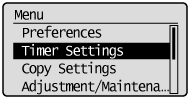
Press [ ] or [
 ] to highlight the menu you want to access, and then press [OK].
] or [] to highlight the menu you want to access, and then press [OK].Preferences
Timer Settings
Copy Settings
Adjustment/Maintenance
System Settings
Initialize Menu
3
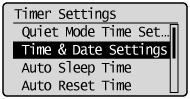
Press [] or [] to highlight a submenu, and then press [OK].
] or [] to highlight a submenu, and then press [OK].For details about the submenus, see "Contents of the Menu Options."
4
Press [OK] to save the changes to the selected menu or select another submenu option.
 |
When <Apply> appears in the screen, you must highlight <Apply> and press [OK] to apply the setting.
|
5
Press [] (Menu) to close the Menu screen.
] (Menu) to close the Menu screen.|
NOTE
|
To display the previous screen:Press [
 ] (Back). ] (Back). |
When [
|