Setting the Auto Sleep Time
|
Before setting the auto sleep time, see "Attention (Auto Sleep Time)."
|
The machine automatically enters the Sleep mode after it has been idle for a specified length of time.
1
Press [ ] (Menu).
] (Menu).2
Press [ ] or [
 ] to highlight <Timer Settings>, and then press [OK].
] or [] to highlight <Timer Settings>, and then press [OK].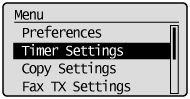
3
Press [] or [] to highlight <Auto Sleep Time>, and then press [OK].
] or [] to highlight <Auto Sleep Time>, and then press [OK].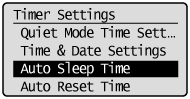
4
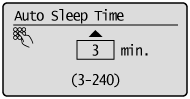
Press [] or [] to specify the time, and then press [OK].
] or [] to specify the time, and then press [OK].
 |
You can also enter values using the numeric keys.
|
|
|
We recommend that you use this option in the default setting.
|
|
NOTE
|
Auto sleep time settings:You can set the auto sleep time between <3> and <240> minutes, in one minute intervals. The default setting is <3> minutes.
|
5
Press [] (Menu) to close the Menu screen.
] (Menu) to close the Menu screen.