Adjusting the Display (Contrast and Inverted Colors)
Adjust the contrast or invert the colors shown on the display if you have difficulty viewing it.
1
Press [ ] (Menu).
] (Menu).2
Press [ ] or [
 ] to highlight <Preferences>, and then press [OK].
] or [] to highlight <Preferences>, and then press [OK].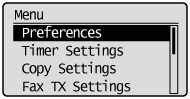
3
Press [] or [] to highlight <Display Settings>, and then press [OK].
] or [] to highlight <Display Settings>, and then press [OK].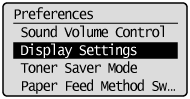
4
Press [] or [] to highlight <Contrast> or <Invert Screen Colors>, and then press [OK].
] or [] to highlight <Contrast> or <Invert Screen Colors>, and then press [OK].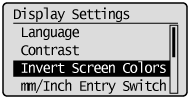
5
Adjust the display.
To adjust the contrast of the screen:
Press [ ] or [
 ] to adjust the contrast of the screen, and then press [OK].
] or [] to adjust the contrast of the screen, and then press [OK].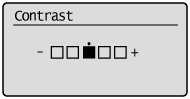
|
[
] key |
Decrease the contrast.
|
|
[
] key |
Increase the contrast.
|
To invert the colors on the screen:
Press [] or [] to highlight <Off> or <On>, and then press [OK].
] or [] to highlight <Off> or <On>, and then press [OK].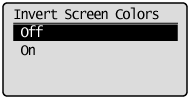
|
<Off>
|
Use the default display colors.
|
|
<On>
|
Invert the display colors.
|
6
Press [] (Menu) to close the Menu screen.
] (Menu) to close the Menu screen.