Changing the Message Display Time
The screen switches at specified intervals to display multiple messages. You can set the duration for the time each message is displayed on the screen. Follow the instructions provided in this section.
1
Press [ ] (Menu).
] (Menu).2
Press [ ] or [
 ] to highlight <Preferences>, and then press [OK].
] or [] to highlight <Preferences>, and then press [OK].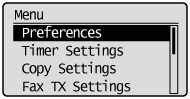
3
Press [] or [] to highlight <Display Settings>, and then press [OK].
] or [] to highlight <Display Settings>, and then press [OK].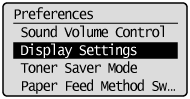
4
Press [] or [] to highlight <Message Display Time>, and then press [OK].
] or [] to highlight <Message Display Time>, and then press [OK].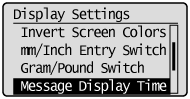
5
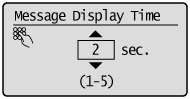
Press [] or [] to specify the time messages are displayed on the screen, and then press [OK].
] or [] to specify the time messages are displayed on the screen, and then press [OK].
 |
You can also enter values using the numeric keys.
|
6
Press [] (Menu) to close the Menu screen.
] (Menu) to close the Menu screen.