Changing the Cursor Movement
Specify whether to automatically move the cursor forward to the end of a word when entering text.
1
Press [ ] (Menu).
] (Menu).2
Press [ ] or [
 ] to highlight <Preferences>, and then press [OK].
] or [] to highlight <Preferences>, and then press [OK].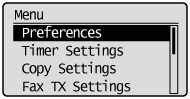
3
Press [] or [] to highlight <Display Settings>, and then press [OK].
] or [] to highlight <Display Settings>, and then press [OK].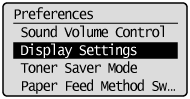
4
Press [] or [] to highlight <Cursor Movement>, and then press [OK].
] or [] to highlight <Cursor Movement>, and then press [OK].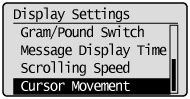
5
Press [] or [] to highlight <Auto> or <Manual>, and then press [OK].
] or [] to highlight <Auto> or <Manual>, and then press [OK].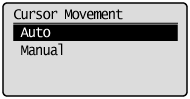
|
<Auto>
|
The cursor moves forward to the end of a word approximately one second after a character is entered.
|
|
<Manual>
|
The cursor does not move automatically. To enter the next character, press [
 ] to move the cursor forward. ] to move the cursor forward. |
6
Press [] (Menu) to close the Menu screen.
] (Menu) to close the Menu screen.