Adjusting the Density
You can adjust the density for a copy job.
To adjust the density for all copy jobs, adjust the density from <Correct Density>.
For details about <Correct Density>, see "Correcting the Density."
1
Place documents.
2
Press [ ] (FAX/COPY) to switch to the Copy mode screen.
] (FAX/COPY) to switch to the Copy mode screen.3
Press [ ] or [
 ] to highlight <Density>, and then press [OK].
] or [] to highlight <Density>, and then press [OK].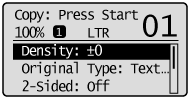
4
Press [ ] or [
 ] to adjust the density, and then press [OK].
] or [] to adjust the density, and then press [OK].
 |
Select <Auto Density> to copy with the density that is suitable for the document.
If other than <Text> is set as <Original Type>, <Original Type> will be changed to <Text> when you select <Auto Density>. |
|
|
Press [
] or [] to adjust <Manual Density>, when either of <Auto Density> or <Manual Density> is selected. |
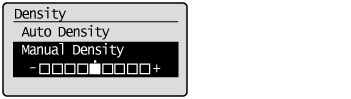
|
[
] key |
Makes the copy density lighter.
|
|
[
] key |
Makes the copy density darker.
|
5
Press [ ] (Start).
] (Start).