Changing Units of Measurement
1
Press [ ] (Menu).
] (Menu).2
Press [ ] or [
 ] to highlight <Preferences>, and then press [OK].
] or [] to highlight <Preferences>, and then press [OK].
3
Press [] or [] to highlight <Display Settings>, and then press [OK].
] or [] to highlight <Display Settings>, and then press [OK].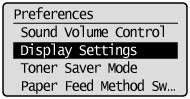
4
Press [] or [] to highlight <mm/Inch Entry Switch>, and then press [OK].
] or [] to highlight <mm/Inch Entry Switch>, and then press [OK].
5
Press [] or [] to highlight <mm> or <Inch>, and then press [OK].
] or [] to highlight <mm> or <Inch>, and then press [OK].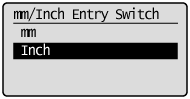
|
<mm>
|
Display length in millimeters.
|
|
<Inch>
|
Display length in inches.
|
6
Press [] (Menu) to close the Menu screen.
] (Menu) to close the Menu screen.