Performing the Configuration Using the Printer's Control Panel (When You First Set it Up)
When configuring the startup waiting time using the printer's control panel, use the following menu hierarchy.
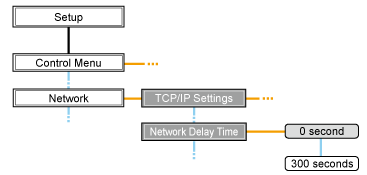
 |
Pressing [
 ] ( ] ( : Settings) displays the common Setup menu. : Settings) displays the common Setup menu. indicates that the procedure is performed by pressing [ indicates that the procedure is performed by pressing [  ] or [ ] or [  ] on the control panel. ] on the control panel.  indicates that the procedure is performed by pressing [OK] on the control panel. indicates that the procedure is performed by pressing [OK] on the control panel. |
|
IMPORTANT
|
After performing the configurationTo enable the settings, perform a hard reset or restart the printer.
For details on a hard reset, see "Canceling All the Jobs (Hard Reset)."
To go back up the hierarchy Press [
 ] ( ] ( : Back). : Back). About the control panelFor details on the control panel, see "Control Panel."
|
1
Press [ ] (: Settings), select [Network] using [ ] and [ ], and then press [OK].
] (: Settings), select [Network] using [ ] and [ ], and then press [OK].When the message is displayed, press [OK].
|
|
You can specify the settings when the printer is either online (the
 (Online) indicator is on) or offline (the (Online) indicator is off). (Online) indicator is on) or offline (the (Online) indicator is off). |
2
Select [Network Delay Time] using [ ] and [ ], and then press [OK].
] and [ ], and then press [OK].3
Specify the setting for startup waiting time using [ ] and [ ], and then press [OK].
] and [ ], and then press [OK].Set a delay of between 0 and 300 seconds from the time the printer is turned ON until it begins communicating.
4
Perform a hard reset or restart the printer.
After performing a hard reset or restarting the printer, the settings are effective.
|
NOTE
|
For details on a hard reset |