Importing and Exporting Settings
You can save (export) printer settings that are set in the printer's control panel or Remote UI to USB memory devices or SD cards. In addition, you can read (import) saved printer settings any time.
This section describes the method for importing and exporting settings using the printer's control panel.
Importing and exporting can also be performed using the Remote UI.
|
IMPORTANT
|
USB memory device connecting locationYou can use either or both of the top-side and rear-side USB ports. When the both ports have a USB memory device connected to them, priority is given to the top-side port.
About USB memory supportOnly the file format FAT32 is supported.
USB memory drives cannot be read by this printer if:
these drives are partitioned
these drives contain encrypted data
Printers that can be importedYou can import the settings only to the same model from which you export the settings.
|
|
NOTE
|
When saving/reading settings using USB memory devices and SD cardsConnect a USB memory device or an SD card to the printer's USB port or SD card slot. The saving location/writing source priority is shown below.
"USB memory" > "SD card"
|
Saving Printer Settings (Export)
Save printer settings to USB memory devices or SD cards.
1
Insert the USB memory device or the SD card into the printer.
2
Press [  ] (
] ( Online).
] (Online).The Online indicator goes off, allowing you to specify the settings on the control panel.
3
Press [  ] (
] ( Settings).
] (Settings).4
Select [User Maintenance] with [ ] and [
 ], and then press [OK].
] and [], and then press [OK].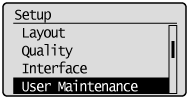
5
Select [IMPORT/EXPORT] with [] and [], and then press [OK].
] and [], and then press [OK].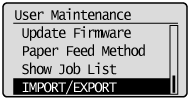
6
Select [EXPORT] with [] and [], and then press [OK].
] and [], and then press [OK].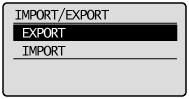
7
When [Yes] is selected using [], and [OK] is pressed, the printer's settings are saved to the targeted saving location.
], and [OK] is pressed, the printer's settings are saved to the targeted saving location.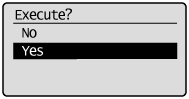
|
→
|
When the saving has finished, <Done.> is displayed.
|
Reading Printer Settings (Import)
Read printer settings that have been saved to USB memory devices or SD cards.
1
Insert the USB memory device or the SD card into the printer.
2
Press [ ] (Online).
] (Online).The Online indicator goes off, allowing you to specify the settings on the control panel.
3
Press [ ] (Settings).
] (Settings).4
Select [User Maintenance] with [] and [], and then press [OK].
] and [], and then press [OK].5
Select [IMPORT/EXPORT] with [] and [], and then press [OK].
] and [], and then press [OK].6
Select [IMPORT] with [] and [], and then press [OK].
] and [], and then press [OK].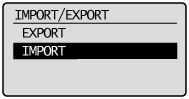
7
When [Yes] is selected using [], and [OK] is pressed, the printer's settings are read from the targeted writing source.
], and [OK] is pressed, the printer's settings are read from the targeted writing source.|
→
|
When the reading has finished, <Done.> is displayed.
|
8
Perform a hard reset or restart the printer.
After performing a hard reset or restarting the printer, the settings are effective.
|
NOTE
|
For details on a hard reset |