If You Want to Adjust Color Balance
The toner density can be specified in the range of "-8" to "+8" and is set to the standard density "0" before shipment.
When adjusting the toner density using the control panel, use the following procedure.
|
IMPORTANT
|
When adjusting the toner densityAdjusting the toner density little by little, print the defective print data from the computer, and then check the printout results. If you cannot adjust the toner density, reset the density to the default value "0", and then contact your local authorized Canon dealer.
|
1
Press [  ] (
] ( Online).
] (Online).The Online indicator goes off, allowing you to specify the settings on the control panel.
2
Press [  ] (
] ( Settings).
] (Settings).3
Select [Quality] using [  ] and [
  ], and then press [OK].
] and [ ], and then press [OK].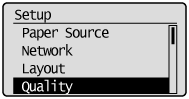
4
Select the toner density of the target color using [ ] and [ ], and then press [OK].
] and [ ], and then press [OK].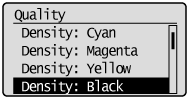
5
Select the density using [ ] and [ ], and then press [OK].
] and [ ], and then press [OK].The toner density is lightest when "-8" is selected and densest when "+8" is selected.
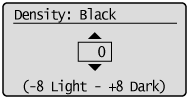
|
→
|
The density is set.
|