
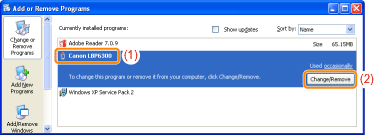
From the [Start] menu, select [Settings] → [Control Panel], and then double-click [Add/Remove Programs].





|
(1)
|
Select [Canon LBP6300].
|
|
(2)
|
Click [Change/Remove].
|
|
(1)
|
Select [Canon LBP6300].
|
|
(2)
|
Click [Uninstall/Change].
|
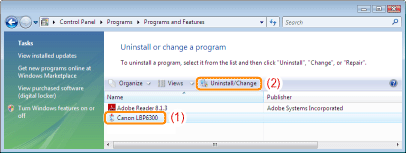
 If [Canon LBP6300] is not listed If the [User Account Control] dialog box appears If [Canon LBP6300] is not listed If the [User Account Control] dialog box appearsClick [Continue] or [Yes].
|
 "
"