Overview of This Function
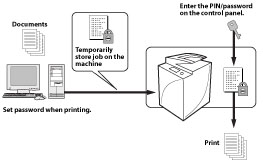
The Secure Print function enables you to prevent other users from viewing the documents you are printing. When using this function, you must enter a PIN/password to start a print job. Also, if you use the optional Encrypted Printing Software, you can encrypt print data.
Setting a PIN for Print Data (Secure Print)
You can print out documents (print data) that have been assigned a PIN and sent to this machine from a computer.
Documents with a PIN are called "secured documents." Secured documents sent to this machine are displayed with a locked document icon ( ) on [Secure Print] on the Main Menu, and are queued for printing.
) on [Secure Print] on the Main Menu, and are queued for printing.