Selecting the Appropriate Printer Driver
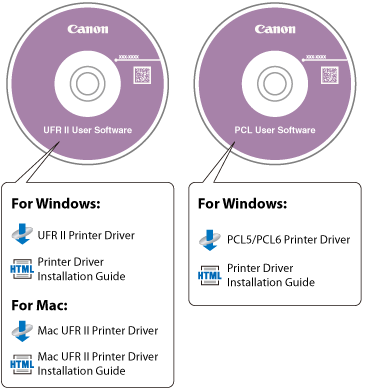
The printer driver is installed from a User Software CD-ROM. If there is more than one CD-ROM, use the following information as a reference and select the appropriate CD-ROM and printer driver.
Content of Each CD-ROM:
Features of the Printer Driver
UFR II Printer Driver:
Using the UFR II printer driver, the various data processing tasks conventionally executed within the printer are appropriately divided between the host PC and the printer to greatly reduce the overall printing time. The workload can be delegated to match the output data, thus realizing a significant increase in speed through optimization.
UFRII LT also uses UFR II technology to process the majority of print data in the host PC, enabling high-speed printing.
|
NOTE
|
|
The CD-ROM supplied with the machine you are using depends on the machine and the system environment.
You can confirm which printer driver(s) you can use by following the procedure below.
1. Press
 on the control panel. on the control panel.2. In the <Check Counter> screen, press [Chk. Device Config.].
3. Confirm the printer driver name displayed under <Option>.
|