2-Sided Copying (MF8580Cdw Only)
 |
|
You can copy two pages of a document on both sides of the paper. You can also copy a two-sided document on both sides of the paper, or on two separate pages.
|
|
NOTE
|
|
<2-Sided> may not be available with some sizes and types of paper.
<2-Sided> is not available when using <Paper Save Copy> or <ID Card Copy>.
|
|
TIPS
|
|
Using the
 key enables you to combine 2-sided copying and <2 on 1>/<4 on 1>: Using the [Paper Save Copy] Key key enables you to combine 2-sided copying and <2 on 1>/<4 on 1>: Using the [Paper Save Copy] Key |

 <2-Sided>
  Select the type of 2-sided copying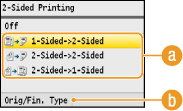
 Types of 2-sided copying
The illustration below shows the types of 2-sided copying.
|
1-Sided->2-Sided
|
2-Sided->2-Sided
|
2-Sided->1-Sided
|
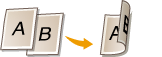 |
 |
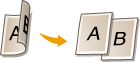 |
 <Orig/Fin. Type>
Specify if you want to change the binding, such as when copying book-type documents in calendar-type format.
 1-Sided->2-Sided
If you want to copy portrait-oriented documents in calendar-type format (short-edge binding)

<Orig/Fin. Type> <Portrait> <Calendar Type>
<Portrait> <Calendar Type> If you want to copy landscape-oriented documents in book-type format (short-edge binding)

<Orig/Fin. Type> <Landscape> <Book Type>
<Landscape> <Book Type> 2-Sided->2-Sided
If you want to create copies with a different binding type than the original
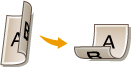

<Orig/Fin. Type> Select the original orientation Select the original binding type Select the binding type for the finished copy, which is different from that of the original document
Select the original orientation Select the original binding type Select the binding type for the finished copy, which is different from that of the original document 2-Sided->1-Sided
This setting enables you to align the direction of the output paper.
When a 2-sided document is in portrait-oriented calendar-type format (short-edge binding)

<Orig/Fin. Type> <Portrait> <Calendar Type>
<Portrait> <Calendar Type> When a 2-sided document is in landscape-oriented book-type format (short-edge binding)

<Orig/Fin. Type> <Landscape> <Book Type>
<Landscape> <Book Type>