Using Registered Destinations
This section describes how to specify destinations registered in the Address Book. Registering Destinations
|
NOTE
|
|
You cannot use the Address Book if you do not have permission to access the folder where the Address Book is saved. Log on as a user who has permission to access the folder, or change the save location of the Address Book.
|
1
Open a document in an application and display the print dialog box.
How to display the print dialog box differs for each application. For more information, see the instruction manual for the application you are using.
2
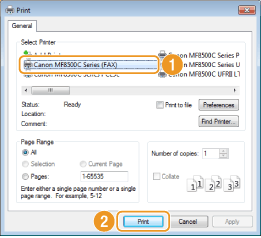
Select your fax driver, and click [Print].
3
Click the [Sending Settings] tab  [Address Book].
[Address Book].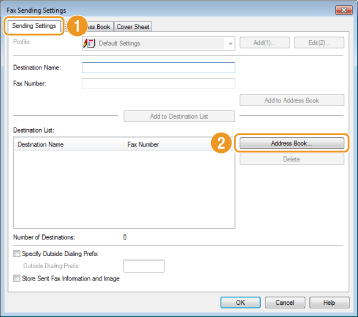
4
Select a destination and click [Add to List] [OK].
[OK].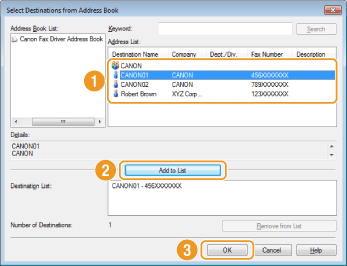
To specify multiple destinations, repeat steps 3 and 4.