Mail Box Settings
You can set and register a name and PIN for a mail box, as well as specify the time that has to elapse before the files in that mail box are automatically deleted.
You can also initialize the registered name, PIN, and time settings.
1.
Press  (Settings/Registration).
(Settings/Registration).2.
Press [Function Settings] → [Store/Access Files] → [Mail Box Settings].
3.
Press [Set/Register Mail Boxes] → press the number of the mail box you want to register settings for.
If you want to initialize the settings, press the mail box number that you want to initialize.
If you enter a mail box number using  -
-  (numeric keys), make sure to enter a two digit number → press [OK].
- (numeric keys), make sure to enter a two digit number → press [OK].4.
Specify each setting → press [OK].
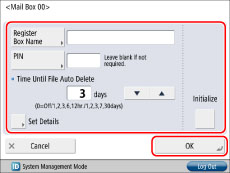
[Register Box Name]:
Press [Register Box Name] → enter a name → press [OK].
Press [Register Box Name] → enter a name → press [OK].
[PIN]:
Press [PIN] → enter up to seven digits for the mail box PIN using - (numeric keys). Press [Confirm] → enter the PIN again for confirmation → press [OK]. You can leave the PIN blank. You cannot store a PIN with only zeros as the number, such as <0000000>.
Press [PIN] → enter up to seven digits for the mail box PIN using
- (numeric keys). Press [Confirm] → enter the PIN again for confirmation → press [OK]. You can leave the PIN blank. You cannot store a PIN with only zeros as the number, such as <0000000>.<Time Until File Auto Delete>:
Press [ ] or [
 ] to set the time before automatic deletion.
Press [
] or [] to set the time before automatic deletion.<Print When Storing from Printer Driver>:
You can select whether to print a file when it is sent from a computer and stored in a mail box. To perform printing, press [Set Details] → [On].
You can select whether to print a file when it is sent from a computer and stored in a mail box. To perform printing, press [Set Details] → [On].
[Initialize]:
To initialize settings, select the mail box that you want to initialize → press [Initialize] → [Yes].
To initialize settings, select the mail box that you want to initialize → press [Initialize] → [Yes].
|
IMPORTANT
|
|
Since there is no way to check a registered PIN, make sure that you write down the PIN that you enter, and keep it in a safe place.
If these settings have been previously specified for individual mail boxes, you can specify [Time Until File Auto Delete] and [Print When Storing from Printer Driver] for [Settings for All Mail Boxes] in [Function Settings] (Settings/Registration), regardless of the PIN settings for each mail box. However, if you update the settings for each mail box separately after using [Settings for All Mail Boxes], the updated settings take preference over the settings set with [Settings for All Mail Boxes]. (See "Specifying Settings for All Mail Boxes.")
|
5.
Press [OK].
|
NOTE
|
|
You can register up to 100 mail boxes.
The numbers for mail boxes are 00 to 99.
Setting a name for a mail box is optional.
You cannot initialize a mail box if there are files still remaining in it.
Setting a PIN for a mail box is optional.
|