Configuring the Settings for Printing Using SSL and Authentication
Communications between the Apple device and machine are encrypted with SSL. Encrypting the data that is transmitted enables you to improve the security of printing using AirPrint. It is recommended that you use SSL when printing confidential documents.
|
IMPORTANT
|
|
Even when you set [Use SSL], communications are not encrypted if the Apple device is connected to the machine via USB.
|
1.
Click [Print Security Settings] on the AirPrint portal page.
The print security settings are displayed.
If [IPP Print Settings] is already set in [Network Settings] (Settings/Registration), the existing settings are displayed.
2.
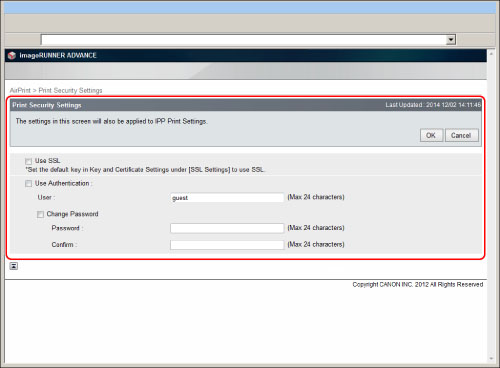
Specify the required settings → click [OK].
|
[Use SSL]:
|
Select this check box.
|
|
[Use Authentication]:
|
Select this check box to use the authentication function.
|
|
[User]:
|
Enter the user name to use for authentication.
|
|
[Change Password]:
|
Select this check box to change the password set for IPP printing.
|
|
[Password]:
|
Enter the password that corresponds with the user name.
|
|
[Confirm]:
|
Reenter the same password for confirmation.
|
|
NOTE
|
|
The values set for [IPP Print Settings] (Settings/Registration) are changed according to the values registered in [Print Security Settings].
|
3.
Click [SSL Settings] on the AirPrint portal page.
4.
Click [Key and Certificate].
5.
Select the key and certificate to use → click [Default Key Settings].
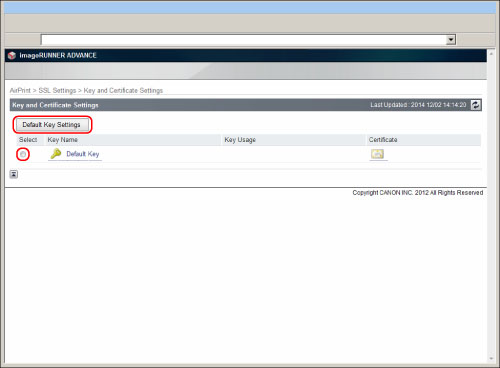
The key and certificate to use for SSL are selected.