Specify to print the User Data list.
The list includes the following information:
Printing the User Data List
Preferences
Timer Settings
Common Settings
Copy Settings
Printer Settings
Adjustment/Maintenance
Paper Settings
|
NOTE
|
|
You cannot print while executing a job.
|
1
Press [ ] (Settings/Registration).
] (Settings/Registration).2
Press [ ] or [
 ] to highlight <Output Reports>, and then press [OK].
] or [] to highlight <Output Reports>, and then press [OK].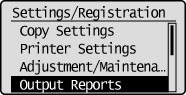
3
Press [] or [] to highlight <Print List>, and then press [OK].
] or [] to highlight <Print List>, and then press [OK].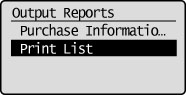
4
Press [] or [] to highlight <User Data List>, and then press [OK].
] or [] to highlight <User Data List>, and then press [OK].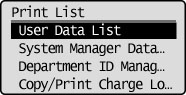
5
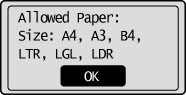
Make sure that paper is loaded in a paper source, and then press [OK].
Load the displayed paper size.
6
Press [ ] to highlight <Yes>, and then press [OK].
] to highlight <Yes>, and then press [OK].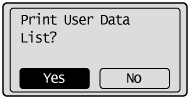
Printing starts.
7
Press [] (Settings/Registration) to close <Print List> screen.
] (Settings/Registration) to close <Print List> screen.